Core fundamentals
Barcode FAQ & technical guide
How scanners see bars and modules, when to choose 1D vs 2D, what EAN-13 and GS1 actually require, why codes fail in production, and practical answers about the free Qrivio generator.
Open the generatorWhat a barcode actually is
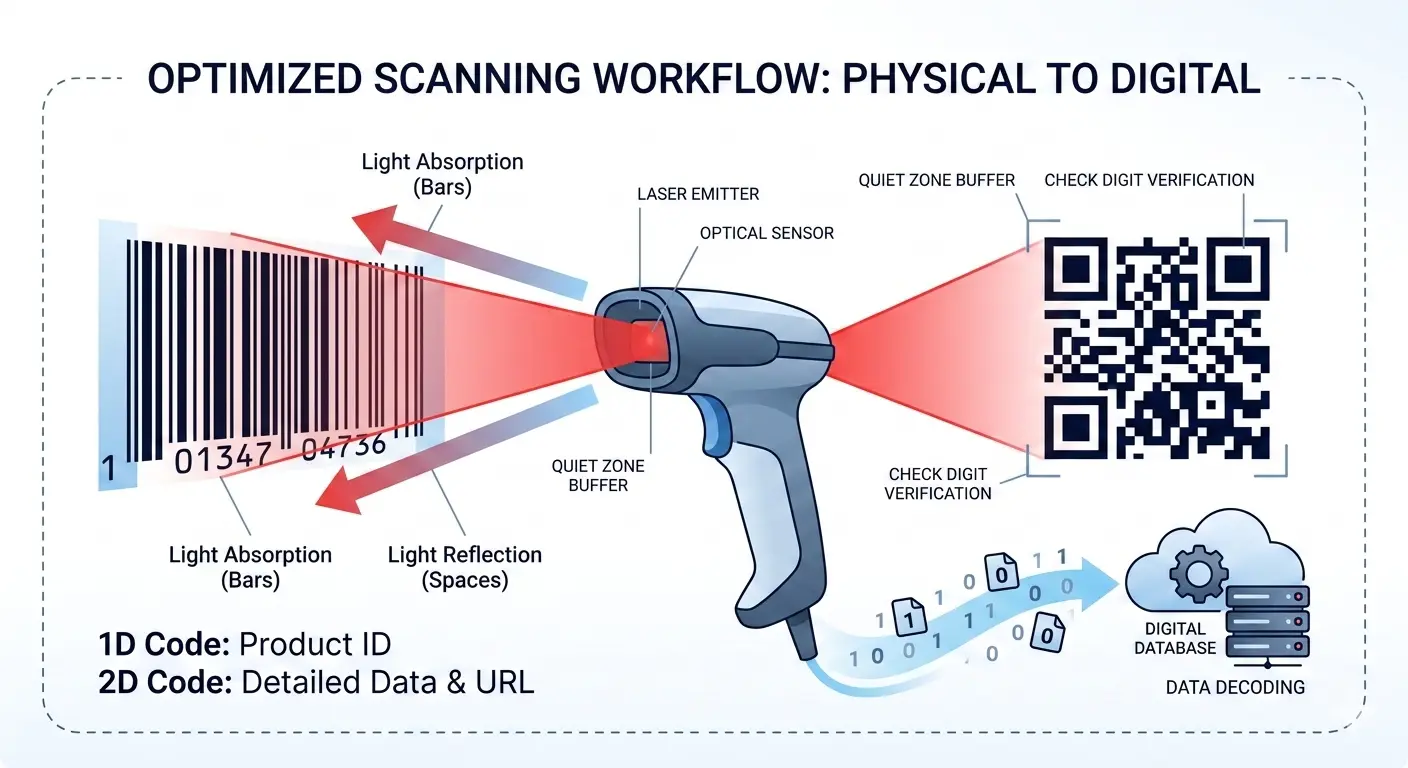
A barcode encodes data as a visual pattern a machine can decode reliably. Dark elements absorb light; light spaces reflect it. The scanner measures transitions and reconstructs the payload. Retail POS, warehouses, pharmacies, and logistics all depend on that optical contract staying intact after print.
1D linear vs 2D matrix
Choose by scanner fleet, payload size, and workflow—not by which format looks newer on packaging.
1D (linear) Data lives in bar and space widths along one axis. Height mainly helps the beam find the symbol. Typical standards: EAN-13, UPC-A, Code 128, Code 39. Laser and CCD readers are common.
2D (matrix) Data occupies a grid of modules. Capacity is far higher in the same footprint. Typical standards: QR Code, Data Matrix, PDF417. Needs an imager (camera), not a single-line laser.
Deeper decision guide: Barcode vs QR Code in 2026.
EAN-13 and GS1 in practice
EAN-13 carries a GTIN-13 used for interoperable retail identification. A product scanned in different countries should resolve to the same licensed identifier—provided you own that number.
Company prefix
Obtain identification capacity from a GS1 Member Organization (or authorized channel).
Item references
Assign unique IDs per trade-item variation (size, colour, packout as required).
Check digit
The 13th digit is Modulo-10 error detection—not a free “extra” digit you invent.
Artwork only
Generating bars without a licensed GTIN can lead to marketplace and retail rejections.
Drawing a valid-looking EAN-13 does not create a GS1 licence. See EAN-13 encoding and EAN-13 for Amazon.
Why codes fail to scan
In high-volume environments a small failure rate is expensive. Most failures are print or layout issues, not “bad math.”
Quiet zone Crowding text, logos, or pack edges into the clear margin prevents reliable start/stop detection.
Contrast Dark-on-dark or light-on-light pairs starve the sensor of reflectivity difference.
Distortion Non-uniform stretch changes bar/space ratios. Scale artwork uniformly per the symbology rules.
Blur & bleed Soft inkjet edges and low-resolution thermal output erase sharp transitions scanners need.
Glare Specular reflection on gloss laminate can blind imagers—test matte finishes under real lighting.
Substrate Printing into corrugated board without the right design (for example ITF-14 bearer bars) lowers read rates.
EAN-13 size reference (illustrative)
Size is a specification, not decoration. Exact allowed ranges depend on the application standard your retailer or printer requires; the table below shows commonly cited 100% / 80% / 200% magnification figures used in packaging discussions.
| Parameter | 100% | 80% (min often cited) | 200% |
|---|---|---|---|
| Width (EAN-13) | 37.29 mm | 29.83 mm | 74.58 mm |
| Height (EAN-13) | 25.91 mm | 20.73 mm | 51.82 mm |
| Quiet zone (each side) | 3.63 mm | 2.90 mm | 7.26 mm |
SVG vs PNG vs JPG
SVG
Best for packaging artwork and print vendors. Scales as vectors; keep quiet zones when placing in layout.
PNG
Strong for digital proofs and many label workflows. Files include quiet-zone padding so bars are not flush to the edge.
JPG
Use when a portal rejects transparency and requires a solid white background. Prefer PNG/SVG when scan reliability is critical.
Symbology quick reference
| Type | Typical use | Notes |
|---|---|---|
| QR Code | URLs, text, digital engagement | Error correction; imager required; single generation on this site |
| Code 128 | Shipping and logistics labels | High density; alphanumeric; Modulo-103 check in the symbol |
| EAN-13 | Global retail trade items | GTIN-13; Modulo-10 check; GS1 allocation required for commerce |
| EAN-8 | Very small packs | GTIN-8; not a shrunk drawing of an unauthorized EAN-13 |
| UPC-A | North American POS | GTIN-12; closely related to EAN-13 with a leading zero |
| Code 39 | Industrial / legacy IDs | Limited charset; lower density than Code 128 |
| ITF-14 | Outer cartons | GTIN-14; bearer bars help on corrugated board |
| MSI Plessey | Shelf / inventory digits | This generator does not invent a check digit—enter what your WMS uses |
| Pharmacode | Packaging-line verification | Integer 3–131070; not a GTIN serialization substitute |
Generate professional assets (four steps)
Choose type
Retail = EAN/UPC. Logistics = Code 128 / ITF-14. Digital links = QR.
Enter data
Match the character set. Retail types reject letters; Code 39 uppercases input.
Set count & format
Linear batches up to 10. Pick SVG, PNG, or JPG before download.
Verify
Check preview captions, then scan a printed sample with your production scanner class.
Free generator FAQ
Practical answers about the home-page tool. For corrections, use the contact page.
How many barcodes per batch? Up to 10 for supported linear types. Split larger lists. See how to create multiple barcodes.
Check digits? For EAN-13 / UPC-A and related retail types, enter payload digits and the tool calculates Modulo-10. A wrong full check digit is rejected, not silently rewritten.
GS1 licence? No. This site does not sell or assign company prefixes or GTINs. Artwork ≠ licensing. See Terms of Use.
PNG, JPG, or SVG? SVG for press and packaging. PNG for proofs and many labels. JPG when a white background is required.
QR in bulk? QR Codes are one at a time here. Use the QR Code guide and generator for single symbols.
MSI check digit? MSI is drawn exactly as entered—no appended Mod 10/11. Include the digit your WMS already uses. Details: MSI Plessey.
Sequential Code 128 / 39? Trailing digits increment; prefixes stay fixed. Do not append the count onto the string.
Retail vs warehouse? Checkout GTINs need authorized numbers. Internal SKUs usually belong on Code 128 or Code 39—not a made-up EAN.