The Advantage of SVG QR Codes in Professional Printing
QR codes have become an essential tool for connecting physical products with digital content. They are used on business cards, product packaging, restaurant menus, event tickets, marketing materials, and countless other applications. While generating a QR code is simple, choosing the right file format can significantly affect print quality, scanning performance, and long-term usability.
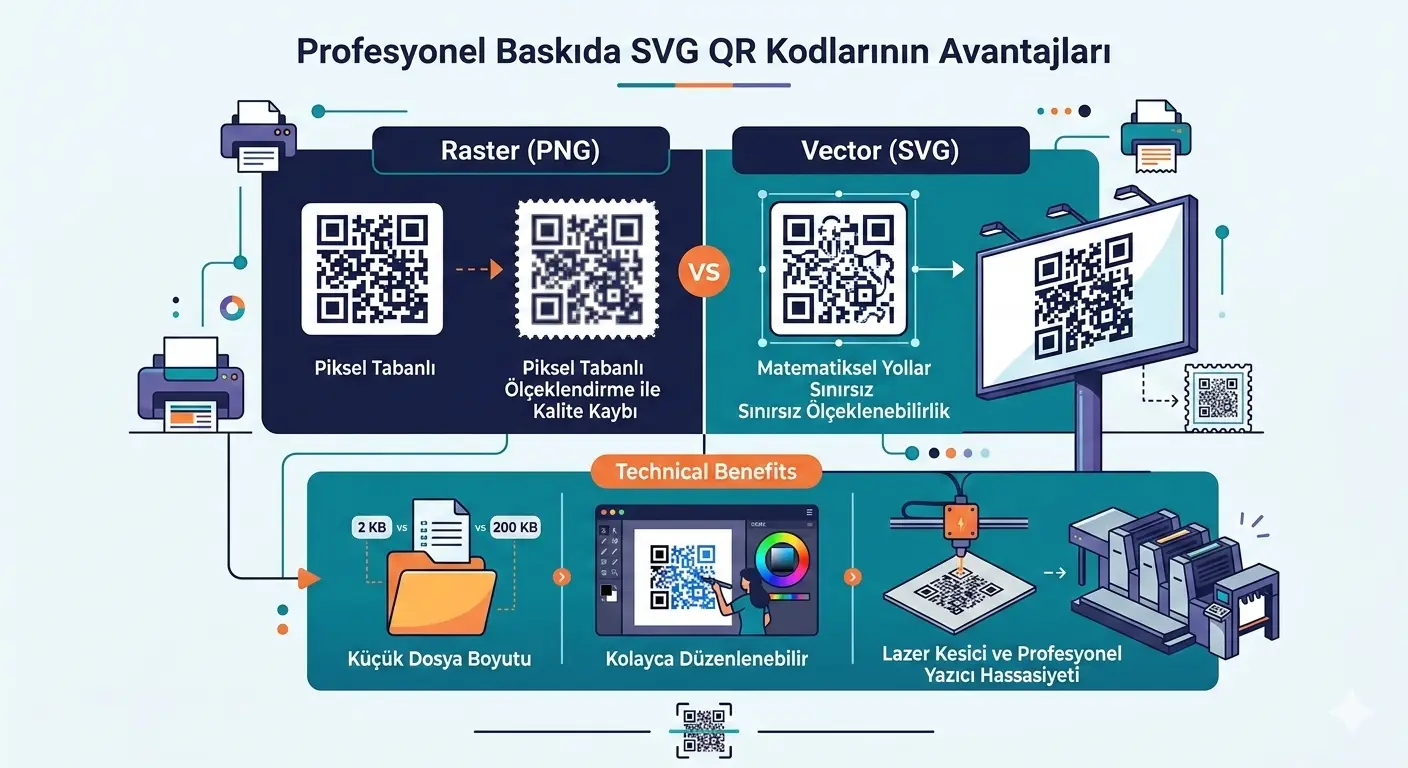
For professional printing, SVG (Scalable Vector Graphics) is widely regarded as the best file format. Unlike raster images such as PNG or JPG, SVG stores graphics as mathematical vector paths rather than fixed pixels. This allows QR codes to remain perfectly sharp regardless of their size, making SVG the preferred choice for designers, printers, marketers, and businesses that require reliable, high-quality results.
Whether you're printing hundreds of product labels or designing a large advertising banner, using an SVG QR code helps ensure that every scan is fast, accurate, and consistent.
What Is an SVG QR Code?
An SVG QR code is simply a QR code saved in the Scalable Vector Graphics format. Instead of storing thousands of colored pixels, SVG files describe each shape using mathematical coordinates. Every square module inside the QR code is represented as a precise vector object that can be enlarged or reduced without affecting image quality.
This makes SVG fundamentally different from image formats like PNG, JPG, or BMP, which contain a fixed number of pixels. Raster images have a maximum resolution, while SVG graphics remain resolution-independent.
Because QR codes rely on clearly defined square modules for accurate decoding, preserving crisp edges is extremely important. SVG achieves this naturally, making it ideal for professional production environments.
How SVG Differs from Raster Images
Raster images work by storing information for every individual pixel. When an image is enlarged beyond its original resolution, the pixels become increasingly visible, producing blurred edges and reducing overall image quality.
SVG files work differently. Since every element is defined mathematically, software redraws the shapes every time the image is displayed or printed. Whether the QR code is 20 millimeters wide or printed across an entire billboard, the edges remain perfectly sharp.
| Feature | SVG | PNG | JPG |
|---|---|---|---|
| Image Type | Vector | Raster | Raster |
| Scalability | Unlimited | Limited | Limited |
| Print Quality | Excellent | Good | Average |
| Pixelation | Never | Possible | Likely |
| Professional Printing | Highly Recommended | Suitable | Not Recommended |
Why Vector Graphics Matter
Every QR code consists of hundreds or even thousands of tiny square modules. Barcode scanners and smartphone cameras rely on these modules having clean, clearly defined edges. Any distortion, blur, compression artifacts, or pixelation can make scanning slower or less reliable.
Because SVG preserves perfect geometric accuracy, every module remains precisely aligned regardless of scaling. This increases readability while reducing the chance of scanning errors on printed materials.
Unlimited Scalability
Perhaps the greatest advantage of SVG is unlimited scalability. A single SVG QR code can be used across many different projects without generating multiple image sizes.
- Business cards
- Flyers and brochures
- Product packaging
- Shipping labels
- Restaurant menus
- Posters
- Roll-up banners
- Billboards
- Vehicle graphics
- Trade show displays
Instead of creating separate PNG files for each printing size, one SVG file can be reused throughout the entire branding process while maintaining identical quality.
Superior Print Quality
Print quality directly affects how quickly and accurately a QR code can be scanned. Professional printing methods such as offset printing, digital printing, thermal transfer printing, and UV printing all benefit from vector graphics because they reproduce clean edges with exceptional precision.
Unlike raster images, which rely on a fixed resolution, SVG files allow printers to render each module with maximum accuracy. This reduces the possibility of blurred edges, uneven module sizes, or visible pixelation that could negatively affect scanning performance.
For businesses producing thousands of labels or marketing materials, maintaining consistent print quality is essential. Even small improvements in readability can reduce scanning failures and improve the overall user experience.
Improved Scanning Reliability
Modern smartphones and commercial barcode scanners are remarkably capable, but they still depend on clear visual information. A QR code with crisp edges and accurate proportions can usually be scanned faster than one that has been enlarged from a low-resolution image.
SVG helps preserve the exact geometry of every module, allowing camera-based scanners to recognize finder patterns, alignment patterns, and encoded data more efficiently. This becomes especially important when QR codes are printed on product packaging, shipping labels, or promotional materials that may be viewed from different distances.
Smaller File Sizes for Many Projects
Although file size depends on the complexity of the design, SVG files are often surprisingly compact. Instead of storing millions of colored pixels, they contain mathematical instructions describing the shapes that make up the QR code.
For simple graphics such as QR codes, this approach frequently results in lightweight files that are easy to store, transfer, and integrate into websites or design projects.
Smaller files also simplify collaboration between designers, printers, and marketing teams by reducing upload and download times while maintaining maximum quality.
Easy Editing for Designers
One of the biggest reasons professional designers prefer SVG is flexibility. Because every element remains editable, the QR code can easily be incorporated into larger branding projects without recreating the artwork.
Popular design applications that support SVG include:
- Adobe Illustrator
- Figma
- Affinity Designer
- CorelDRAW
- Inkscape
- Sketch
Designers can resize the QR code, change colors, align it precisely with other graphic elements, or include it within marketing materials while preserving the underlying structure required for reliable scanning.
Perfect for Branding
Many businesses want QR codes that complement their visual identity instead of appearing as plain black-and-white squares. SVG makes this much easier because vector objects can be customized without degrading image quality.
Brand colors, surrounding graphics, and layout adjustments can all be incorporated while maintaining proper QR code proportions. However, readability should always remain the highest priority. Excessive styling, poor color contrast, or oversized decorative elements may reduce scanning performance.
A professionally branded QR code should balance visual appeal with technical reliability, ensuring that users can scan it quickly under different lighting conditions and viewing angles.
Where SVG QR Codes Are Commonly Used
- Business cards
- Product packaging
- Restaurant menus
- Retail displays
- Product labels
- Posters and banners
- Trade show booths
- Vehicle wraps
- Magazine advertisements
- Corporate brochures
- Instruction manuals
- Event tickets
Because one SVG file can be reused across all these applications, businesses maintain a consistent appearance while simplifying their production workflow.
Common Mistakes When Printing QR Codes
- Using low-resolution raster images for large prints.
- Stretching the QR code horizontally or vertically.
- Reducing the required Quiet Zone.
- Printing with poor color contrast.
- Adding excessive visual effects that cover important modules.
- Compressing images before printing.
- Testing only on one device instead of multiple scanners.
Avoiding these mistakes helps ensure that your QR codes remain functional regardless of where they are displayed or how frequently they are scanned.
Best Practices for Printing SVG QR Codes
Creating a QR code is only the first step. To achieve reliable scanning in real-world environments, it is important to follow a few printing best practices. Even a perfectly generated QR code can become difficult to scan if it is printed incorrectly or placed in an unsuitable location.
- Maintain sufficient white space (Quiet Zone) around the QR code.
- Use high-contrast colors, such as black on a white background.
- Avoid stretching or distorting the QR code's proportions.
- Place the QR code on a flat, unobstructed surface whenever possible.
- Test the printed QR code using multiple smartphones and QR scanners before mass production.
- Use SVG for commercial printing to ensure maximum sharpness.
- Avoid covering the QR code with glossy laminates that may create reflections.
Following these recommendations helps improve scanning speed while reducing the risk of failed scans caused by printing or placement issues.
Frequently Asked Questions
Is SVG better than PNG for QR codes?
For professional printing, yes. SVG files remain perfectly sharp regardless of size, while PNG images depend on their original resolution and may become pixelated when enlarged.
Can SVG QR codes be used online?
Absolutely. Modern web browsers fully support SVG, making it an excellent choice for responsive websites, landing pages, digital brochures, and online marketing materials.
Will resizing an SVG QR code affect its readability?
No. Since SVG graphics are vector-based, they can be enlarged or reduced without losing quality. As long as the QR code maintains its proportions and adequate Quiet Zones, readability remains unchanged.
Can I change the color of an SVG QR code?
Yes. SVG files are fully editable, allowing designers to customize colors to match branding. However, sufficient contrast between the foreground and background should always be maintained to ensure reliable scanning.
Why do professional designers prefer SVG?
SVG integrates seamlessly with popular design applications, supports unlimited scaling, produces sharp print output, and simplifies editing without sacrificing quality.
When should I use PNG instead?
PNG is a good option for quick digital sharing, documents, presentations, and situations where further editing or large-scale printing is not required.
Generate High-Quality SVG QR Codes with Qrivio
Qrivio makes it simple to create professional SVG QR codes for both digital and print applications. Generate your QR code in seconds, customize its appearance, and download a clean, scalable SVG file ready for business cards, product packaging, brochures, marketing materials, signage, or commercial printing.
Whether you're designing promotional materials, packaging consumer products, or creating branded marketing assets, SVG provides the flexibility and print quality needed to achieve professional results while maintaining excellent scan reliability.
Conclusion
SVG has become the preferred file format for professional QR code production because it combines unlimited scalability, exceptional print quality, and complete design flexibility. Unlike raster image formats, SVG preserves perfectly sharp edges at any size, making it ideal for everything from small product labels to large-format advertising.
Businesses, designers, and print professionals benefit from using SVG because it simplifies production workflows, improves scanning performance, and ensures consistent visual quality across a wide range of applications. Whether you're creating packaging, business cards, posters, menus, or promotional displays, choosing SVG helps future-proof your QR codes and ensures they remain accurate, professional, and easy to scan.
By generating SVG QR codes with Qrivio, you can confidently produce high-quality graphics suitable for modern branding, commercial printing, and digital distribution—delivering a better experience for both your business and your audience.